Enthusiast turns tiny Mac alarm clock into a fully functional mini Mac

 By Sergey K
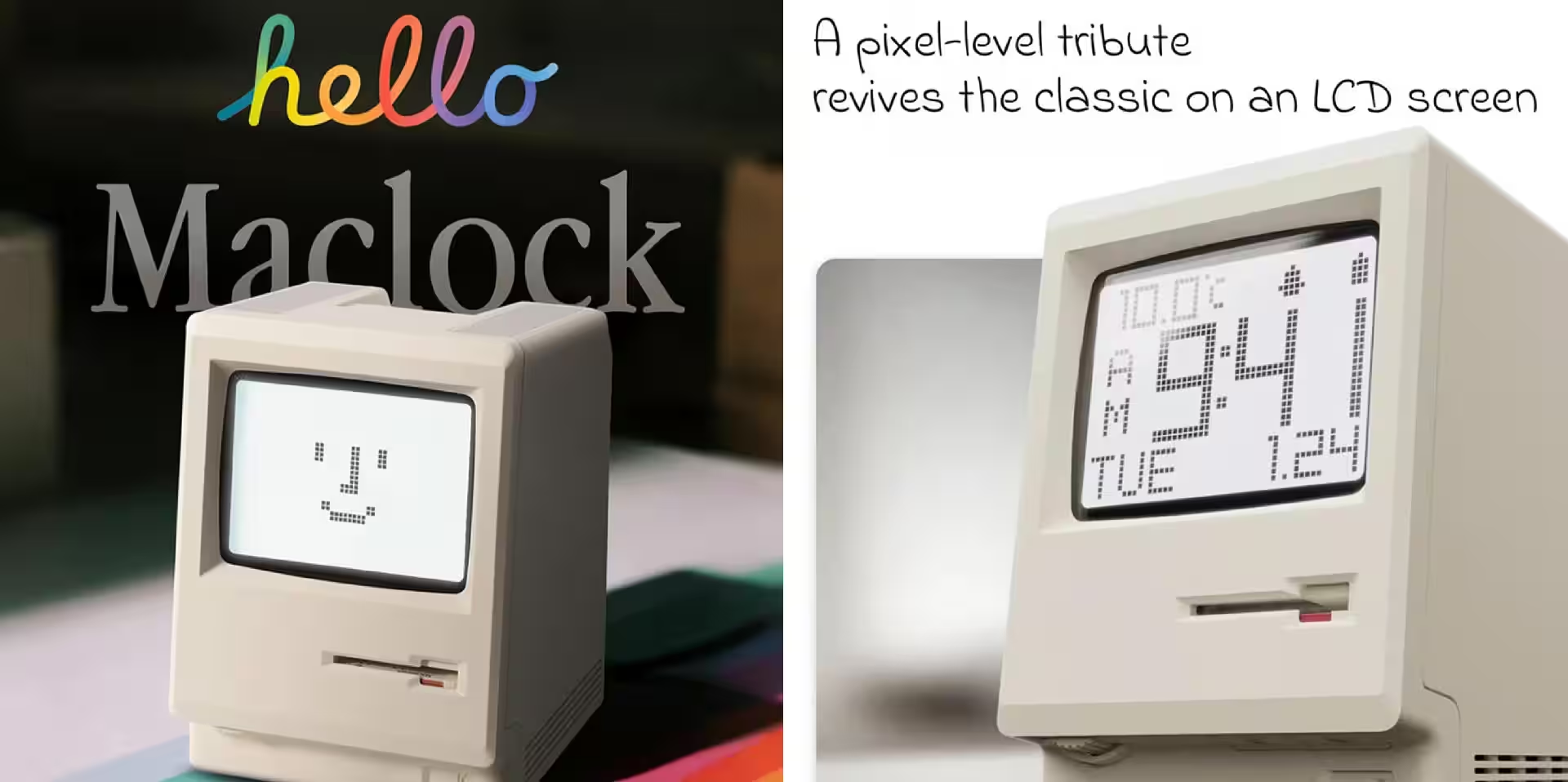
A maker transformed a $30 plastic “Mac” alarm clock into a fully working retro computer. Inside the Maclock case sits a Raspberry Pi Zero W, a 2.8-inch Waveshare touchscreen, and a Mini vMac emulator that boots classic Mac software on startup. Dubbed WonderMac, the project cost about $100 and comes with a GitHub repository featuring software and 3D printable parts.
At first glance, it looks like a cute gadget for retro fans. But on closer inspection, it’s a showcase of how affordable single-board computers and accessible displays have made it easy to transform novelty devices into real, usable machines. The winners here are the modding community and vintage Mac enthusiasts; the downside is if you expect a “full-fledged computer” straight out of the box from an inexpensive toy replica.
Project components and cost
The build is straightforward and reproducible:
- Base Maclock alarm clock (~$30) – provides the shell and aesthetic;
- Raspberry Pi Zero W – the project’s brain, powered via soldered connections;
- Waveshare 2.8-inch SVGA touchscreen – perfectly sized for the case;
- Mini power board – original USB-C charging circuit removed, supplying direct 5 V power to the Pi;
- 3D-printed mounts for the screen and Pi (files included on GitHub);
- Mini vMac emulator (recompiled from source) set to auto-start on power-up.
The total cost came to around $100, with most of the budget going to the display and peripherals-the plastic case is mostly decorative. A key technical detail: the Maclock’s original USB-C port is used for power, but the charging circuitry was disabled to deliver clean 5 V directly to the Pi.
How classic Mac software was made to run
The initial idea to run a modern Snow emulator was abandoned due to compatibility issues on the low-powered Pi Zero. Instead, the maker settled on Mini vMac – a lightweight emulator for classic 68k Macs. After recompiling it from source for the Pi Zero W, the emulator was configured to launch at boot, so the alarm clock immediately displays a working Mac desktop.
The project required three main efforts: hardware fitting (mounting the screen and Pi inside the case), electrical modifications (soldering power wires to the Pi board), and software assembly (recompiling the emulator, installing Waveshare drivers, and setting up auto-launch). All of this is documented in the WonderMac GitHub repository, enabling others to replicate the build.
How this fits into modding and emulation trends
WonderMac exemplifies a dual trend: cheap mass-market “retro toys” as upgrade platforms, and affordable single-board computers turning these toys into genuine devices. Modders long ago converted Game Boys into full consoles (like the Game Boy Zero) or installed Raspberry Pis in vintage shells – and now it’s the turn of tiny Mac alarm clocks.
Classic system emulation remains a key way to preserve legacy software and give it a “physical” home. Projects like Mini vMac let you run historic apps and games on modern hardware, although licensing ROMs and copyright remain gray areas-typical of the retro emulation scene.
Who might want to try this mod
This project appeals to anyone willing to invest time and a modest budget for a unique gadget: collectors, computer history educators, streamers, and DIY enthusiasts. It’s not a shortcut to a cheap working Mac – the final device is stylish but can’t match the usability or ergonomics of real retro Macs.
For the Maclock manufacturer, mods like this could actually cause confusion: buyers looking for a fully functioning “mini Mac” might be disappointed if they expect it to work straight out of the box. Meanwhile, display makers, small electronics producers (Waveshare, Raspberry Pi), 3D printing services, and open project platforms benefit – these hacks inspire new builds, tutorials, and community engagement.
If you’re thinking of trying this yourself, check out the WonderMac GitHub repository, keep in mind power supply limits and screen size constraints, and be ready for some soldering and case fitting.
Looking ahead
Expect many more “smart” mods of mass-market toys as affordable electronics and open tutorials turn this into a quick, budget-friendly hobby. Next up, modders will likely add sound, external controller support, and network features, so these tiny gadgets not only look retro but can share files and media too.