Adobe has added new AI tools to Premiere and After Effects
 By ForGeeks
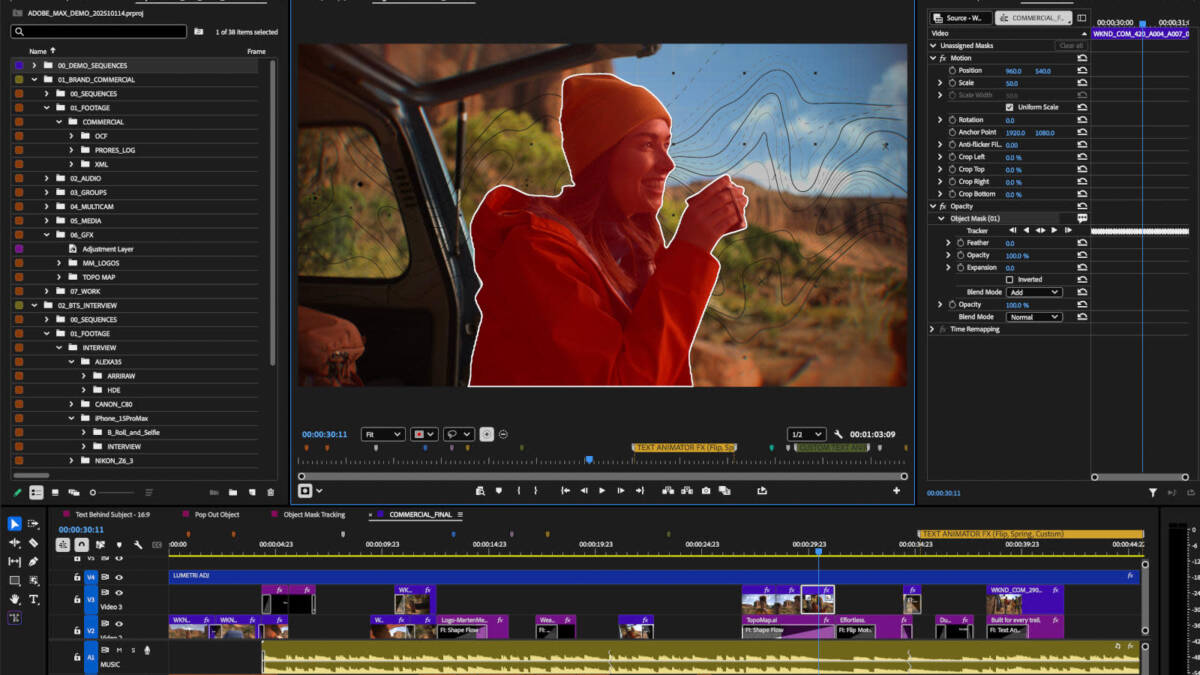
Adobe announced updates to Premiere and After Effects, introducing new artificial intelligence-based tools designed to speed up and simplify video workflows. Premiere, the company’s flagship video editing program, introduces a new AI-enabled Object Mask feature that allows users to quickly select and track people or objects moving in the frame. The user just needs to move the cursor over the desired object and click, after which the mask is created automatically in just a few seconds. Initially it is formed quite accurately, but if necessary, it can be manually adjusted or resized. Adobe notes that for this function uses its own AI model, and processing is performed locally on the device. The company also emphasizes that user data and actions are not used to train the models.
The update also affects the Shape Mask tool. Redesigned ellipse, rectangle, and pen masks can now be created directly from the toolbar. They’re now more precise and easier to move and customize. In addition, masks are now able to track objects in video clips about 20 times faster than before, reducing the need to constantly monitor the progress bar. Another new addition to Premiere makes it easy to import media from Firefly Boards — Adobe’s AI-enabled digital canvas. In addition, Adobe Stock is now fully integrated directly into Premiere.
For After Effects, Adobe released an update that adds support for importing SVG files commonly used in Illustrator. Users are also now able to create graphics and photorealistic objects within images using parametric 3D meshes. These meshes include shapes such as cubes, spheres, cylinders, cones, tori and planes, expanding visual effects and compositing possibilities.