Apple and Google will make it easier to switch between iOS and Android
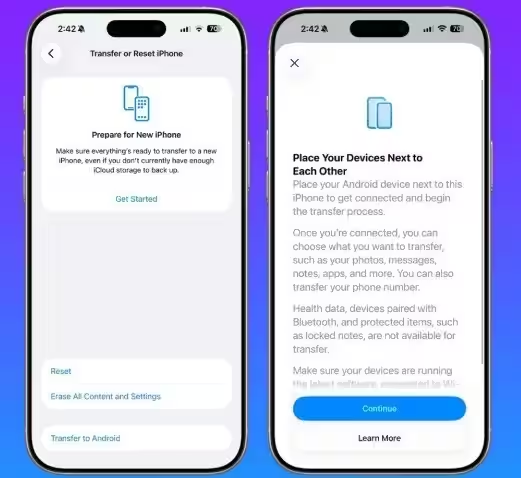
source type=”image/avif” srcset=”https://itzine.ru/wp-content/uploads/2025/12/in-ios-26.3-apple-will-make-it-easier-to-switch-to-android-180×180.avif 180w, https://itzine.ru/wp-content/uploads/2025/12/in-ios-26.3-apple-will-make-it-easier-to-switch-to-android-400×400.avif 400w, https://itzine.ru/wp-content/uploads/2025/12/in-ios-26.3-apple-will-make-it-easier-to-switch-to-android-600×600.avif 600w, https://itzine.ru/wp-content/uploads/2025/12/in-ios-26.3-apple-will-make-it-easier-to-switch-to-android-640×360.avif 640w, https://itzine.ru/wp-content/uploads/2025/12/in-ios-26.3-apple-will-make-it-easier-to-switch-to-android-800×450.avif 800w, https://forgeeks.pro/wp-content/uploads/2025/12/in-ios-26.3-apple-will-make-it-easier-to-switch-to-android.avif 1200w”> It was reported earlier this month that a fresh version of Android Canary — Android’s earliest experimental channel — showed signs that Apple and Google are working to simplify the transition between iOS and Android both ways. The Android Canary 2512 update (ZP11.251121.010) is already rolling out to Pixel smartphones and contains the Android portion of the new data transfer tool. iPhone users, for their part, will get the necessary software with the release of iOS 26.3. This is confirmed by the fact that Apple has released iOS 26.3 Beta 1, which features a new and convenient way to migrate to another platform. The author of the piece notes that he often switches between Android and iOS and has previously used the Quick Switch adapter that used to come in the box with the new Pixels. It was a small USB-A to USB-C adapter that allowed you to directly connect your old iPhone or Android smartphone to the new Pixel. Now, instead, it’s a regular charging cable that plugs into both devices and allows you to transfer some of your data — contacts, photos, messages, apps and other information — from the old phone to the new one. The Quick Switch is a USB-A to USB-C adapter that you can use to directly connect your old iPhone or Android smartphone to the new Pixel. Apple and Google already have their own apps to make switching platforms easier. If a user is switching from iPhone to Android and doesn’t want to mess around with cables, you can install the Android Switch app from the App Store. For switching from Android to iOS, the Move to iOS app is available on Google Play. Until Apple and Google officially unveil the new tool, these apps remain the easiest way to switch ecosystems. Apple recently released iOS 26.3 Beta 1, which beta program participants can install via «Settings» → «Basic» → «Software Update». One of the new features is the «Transfer to Android» option. It can be found under «Settings» → «Basic» → «Transfer or reset iPhone». When the function becomes available, a separate button will appear there. It will allow users to transfer contacts, messages, notes, and photos from their iPhone to their new Android smartphone. The «Transfer to Android» feature is wire-free and uses a direct connection between devices over Wi-Fi and Bluetooth, similar to how AirDrop works. This means that data will be transferred directly between smartphones. For those who have long considered switching from iOS to Android but have been hesitant because of the complexity of transferring data, the new feature could be a decisive argument. After pressing «Transfer to Android» the iPhone and Android device will need to be placed side by side to establish a connection and begin the transfer process. The user will be able to choose what data to transfer — photos, messages, notes, apps and more. The transfer of one’s own phone number is also supported. However, health data, Bluetooth devices and protected items such as locked notes cannot be transferred.